A generated shot often comes back at 480p or 720p. Drafting low is how you keep a dozen takes affordable. But the take you pick is still soft, and on a big screen it shows. The beard turns to a smear and the eyes lose their edge.
In Cask Film you fix that without leaving the timeline.
Open it from the clip
Select a clip on the timeline and choose Upscale from the Tools menu. It is also in the clip's right-click menu, in the inspector's Tools tab, and on any video card on the canvas.
A sheet opens with two choices: the engine, and the size you want back.
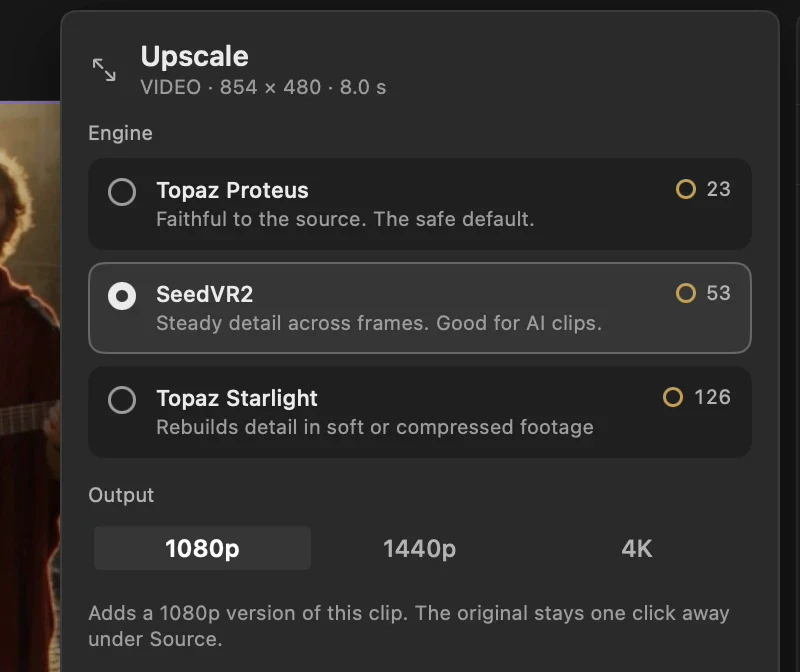
Output offers 1080p, 1440p and 4K. The number is the short side of the frame, so a vertical clip at 1080p comes back 1080 wide. Each engine shows its price up front, and the price follows the output you choose.
Choose the engine
All three run in the cloud and keep the clip's length.
- Topaz Proteus is faithful to the source. It sharpens what is there and invents nothing, which makes it the safe default and the cheapest of the three.
- SeedVR2 holds detail steady from frame to frame. That is the one to try first on a generated clip, where an upscaler that guesses differently on every frame makes skin and hair crawl.
- Topaz Starlight rebuilds detail in footage that is soft or badly compressed. It works hardest and costs the most. Save it for a shot the others cannot rescue.
Here is one frame of a busker, cropped to his face from an 854x480 shot. On the left, the original scaled up to 1080p. On the right, the SeedVR2 version.
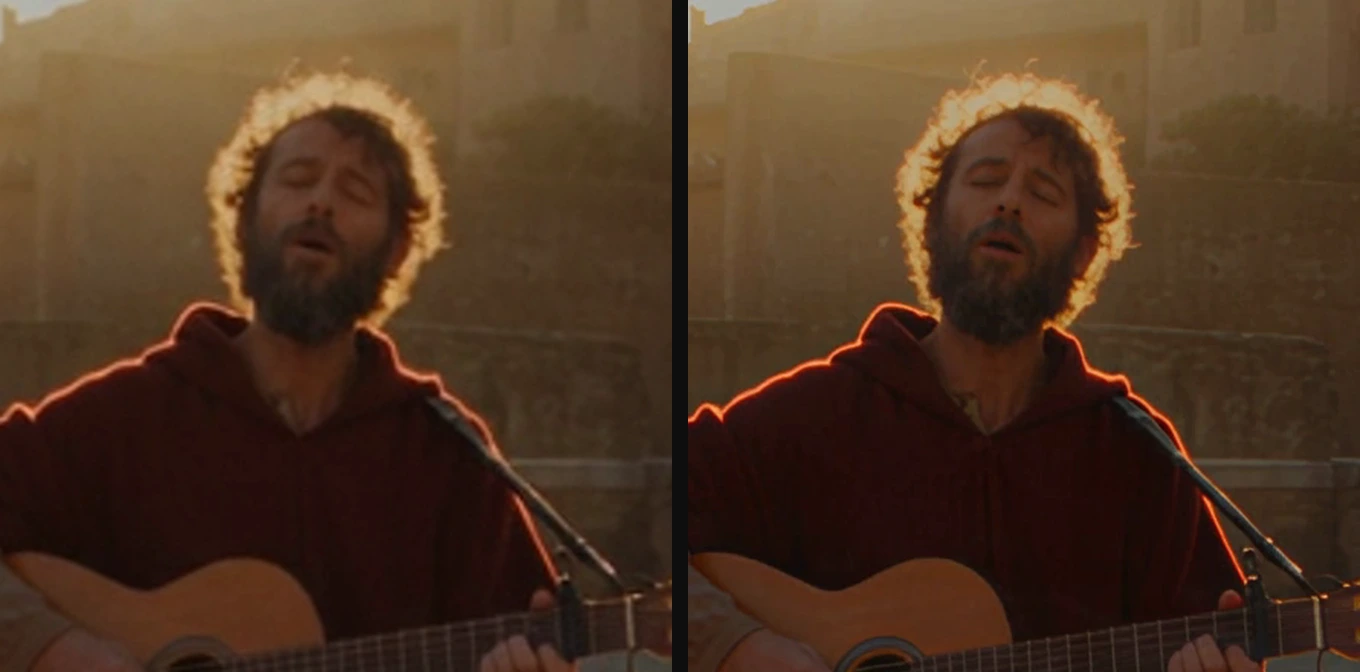
The light and the face are the same. The hairs in the backlight and the lines around his eyes are what came back.
A new version, not a new file
Upscale does not replace your clip. It adds a version to it.
When the run lands, the clip plays the upscaled media and carries a 1080p badge on the timeline. Your trims, your timing and every modifier on the clip stay where they were. Nothing to relink, no second copy of the shot to keep in step.
The original stays one click away under Source in the inspector. Switch between the versions to see the difference, or press Compare to wipe one against the other in the viewer. If the upscale is wrong for the shot, Delete version removes it. The original cannot be deleted, so there is always a way back. Switching and deleting are each one step in your history, so one Undo reverses either.
On the timeline, only the part of the clip you use is sent. Trim a 10-second take to the 3 seconds you need, and Upscale works on those 3.
When to run it
Once the edit settles. Generate low, compare, cut. Upscaling every draft spends money on shots that never make the film. Upscaling the keeper spends it once.
Before a close-up. Push in on a face with a scale or a crop and a 480p source falls apart fast. Upscale first, then push. The frame has the pixels to give.
Before export. Run through the cut, find the clips that look soft against their neighbours, and bring them up to the timeline's resolution. A cut made of mixed sources reads as one piece when every shot holds up equally.
Or ask for it
Cask MCP connects the app to Claude and Codex, and it is on every plan.
"Upscale the third clip to 4K with SeedVR2."
The agent finds the clip and runs it. The new version lands as one Undo step, exactly as a press of the button would.