A generated shot can be right in every way but one. The light is good, the camera move lands, the timing works. And the person in it is not the person in your film.
Prompting again rarely fixes that. A new take brings a new face, but it also brings a new camera, new timing and new light. You traded the one thing you wanted to change for everything you wanted to keep.
Recast changes only the person.
A Magic does a whole job on one card
Most tools in Cask Film do one thing to a clip. Upscale it, slow it down, split its sound. A Magic is a canvas card that does a whole job for you, start to finish, and hands back the result. You never see the steps. You set it up, you see the price, you get a video.
Recast is the Magic that ships today. It swaps the people in a clip for new ones, from a photo of each new person. Their movement, the camera and the sound stay as they were.
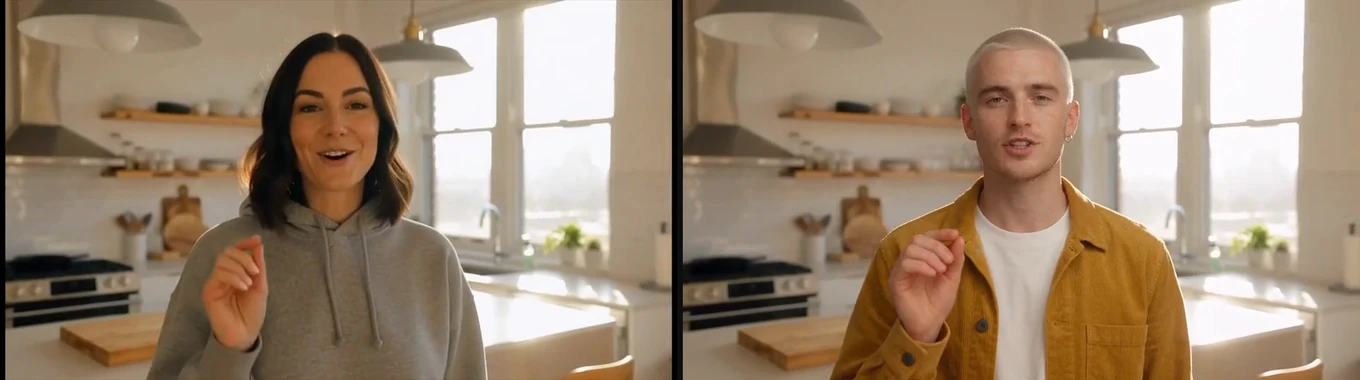
Same kitchen, same window light, same hand raised at the same moment. A different person.
Set it up
Drag the wand from the canvas toolbar to drop a Magic card, and choose Use Recast. The card's settings open beside the canvas.
Video. Pick a clip from the canvas or the library. It has to run 4 to 15 seconds and be at least 480p. A longer clip opens in Trim & crop, where you pick the part you want. The crop is there for a logo in the corner or a frame you want tighter.
Cast. Cask Film finds the people in the clip on your Mac, for free, and lists each one by their face, up to four. Give a photo to each person you want replaced. Anyone left without a photo stays as they are, so you can recast one person in a group of three.
Direction. An optional line of text for anything the photo does not say, such as the wardrobe or the time of day.
The price sits above the button before you press anything. Some parts of the job can run on your Mac instead of the cloud. When a download would make that possible, Recast offers it under Pay less by running parts on this Mac, and the price drops once it is installed.
Draft first, then decide
Press Make draft. Recast makes a quick 480p version first. It costs a fraction of the final, and it is the review: you see who went where and how the new person moves before you pay for the full render.
The draft plays on the card with the clip's original sound. Then you choose.
- Approve renders the final in 1080p from that draft.
- Use draft keeps the 480p draft as the result and spends nothing more. Sometimes it is enough for a social cut or an animatic.
- Again makes a new draft. Everything Recast prepared the first time is kept, so a second draft costs only the generation itself.
Approve the draft within a day. After that, Recast offers a new draft instead.
If a run stops partway, the card keeps everything it finished. Continue picks it up from where it stopped. If a photo was refused, swap it and continue, and Recast redoes only what that photo touched.
What you get back
The final is an ordinary video card with a small Recast badge. Drag it to the timeline, play it, feed it into another tool or generation.
If the original clip is already on your timeline, the recast lands there as a new version of that clip. Your cut stays put. One Undo removes it.
The sound is the clip's own sound, put back exactly as it was. Nothing in the mix has to be redone.
When to reach for it
Put your own cast into a generated shot. You found the take you want. The model gave you a stranger. Recast it with a photo of your actor, or of the character you designed, and it joins the film.
Hold a character steady across a scene. A face drifts when each take is made on its own. Recast every take with one photo and that face carries through the sequence.
Try another actor. Casting on a generated film is cheap at the draft stage. Run one clip with two photos, compare the drafts side by side on the canvas, and approve the one that plays.
Or ask for it
Cask MCP connects Cask Film to Claude and Codex, and it is on every plan.
"Use Recast on the third clip on the canvas with this photo. Make a draft and tell me what the final costs."
The agent sets up the card, quotes both prices, and stops there until you answer.